
Web Building at UMW
  • Returning Users:
  • Sites@UMW Sign-In
  • |
  • Domain of One’s Own Sign-In
  • |
  • Get Support
  • Menu Menu

Website Building at UMW

Getting Started

  • Domain of One’s Own Overview
  • Before You Sign Up
  • Best Practices for Choosing a Domain Name
  • Getting to Know Your Web Space
  • I Set Up My Account, Now What?
  • Introduction to cPanel
  • Accounts & Passwords

Control Panel

  • Introduction to cPanel
  • Creating a Subdomain
  • Subdomains vs Subdirectories
  • Cleaning up Storage Space
  • Adding a Redirect
  • Adding a New Domain Name

Web Applications

  • Sitejet Builder: Getting Started
  • What is a Web Application?
  • Installing Applications with Installatron

Wordpress

  • Introduction to WordPress Overview
  • Installing WordPress
  • WordPress Editor
  • WordPress Settings
  • Posts and Pages
  • Categories, Tags, and Menus
  • Themes and Customizing Your Site
  • Classic vs Block Themes
  • Basic Privacy
  • Changing Your Display Name
  • Themes and Plugins – Recommendations
  • Uninstalling WordPress
  • Best Practices for Handling Media
  • Cloning a WordPress Installation
  • Creating Footnotes in WordPress
  • Adding a New User to a WordPress Site
  • Resetting your WordPress Password
  • Migrating Sites@UMW to DoOO
  • Feeds (RSS)

Additional Resources

  • Achieving Digital Accessibility on Domain of One’s Own and Sites@UMW 
  • Technical Details: What is the server set-up like?
  • Sites@UMW or Domain of One’s Own?
  • Troubleshooting
  • Accessible Web Design

Web Security

  • Accounts & Passwords
  • Securing Your Site with SSL

Leaving UMW Domains

  • Leaving Domain of One’s Own: Overview
  • Leaving Domain of One’s Own: The Practical Steps

Omeka

  • Omeka Guide
  • Troubleshooting Omeka
View Categories

What is a Web Application?

In the most general terms, a web application is a piece of software that runs on a web server. A web server is just a specialized computer designed to host webpages.

Most web applications are comprised of two components: files and a database. When you install a web application, you will need to make sure all of the files are copied over into the appropriate location and that a database (and database user) has been set up to connect to those files. Often, you will have to do some configuration to make sure the application knows how to access the database.
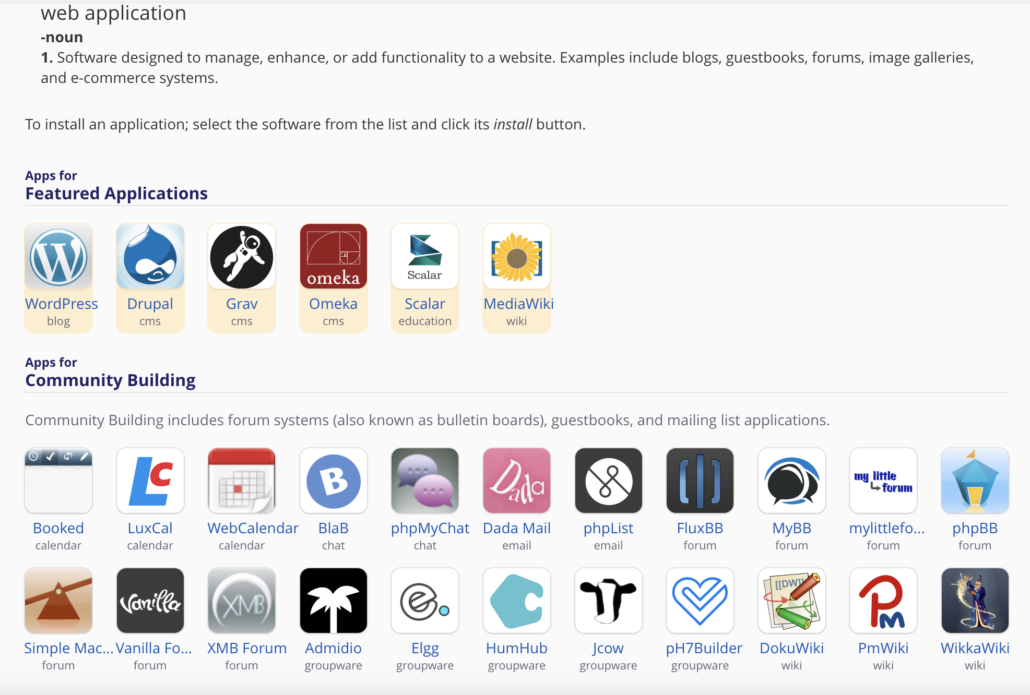
In Domain of One’s Own, you can choose from over 100 Web Apps to install on your domain. Using subdomains and subdirectories, you can even install different apps to run different parts of your sites.

The system we use for Domain of One’s Own uses a special script installer called Installatron (in cPanel) that allows you to automatically install dozens of open source applications. When you use Installatron, you don’t need to worry about moving files, creating databases, or doing the initial configuration. It’s all taken care of for you. 

In order to run on the Domain of One’s Own server, web applications must be able to run on a LAMP server, which is the particular kind of web server that we use. Occasionally, a web application may require additional components or modules that need to be installed on the server.


This content is adapted from the Create Documentation by The University of Oklahoma’s Center for Teaching Excellence which is licensed under a Creative Commons Attribution-ShareAlike 4.0 International License.

Reviewed by Abby Firestone 06/23/26

Powered by BetterDocs

University of Mary Washington logo

Web Building at UMW

About

Terms of Service

Subdomains vs Subdirectories Installing Applications with Installatron
Scroll to top