
Web Building at UMW
  • Returning Users:
  • Sites@UMW Sign-In
  • |
  • Domain of One’s Own Sign-In
  • |
  • Get Support
  • Menu Menu

Website Building at UMW

Getting Started

  • Getting Started with Sites@UMW
  • Creating Additional Sites

Additional Resources

  • Achieving Digital Accessibility on Domain of One’s Own and Sites@UMW 
  • Sites@UMW or Domain of One’s Own?
  • Accessible Web Design

Creating Content

  • Categories, Tags, and Menus
  • Posts and Pages
  • WordPress Settings
  • WordPress Editor

Site Administration

  • Migrating Sites@UMW to DoOO
  • Deleting Your Sites@UMW Site
  • Adding Users to a Site
  • Changing Your Display Name
View Categories

Deleting Your Sites@UMW Site

If you want to delete a site you don’t need anymore you can follow the steps below. Please note if you delete the site you cannot use the same URL again. If you want to start over with the same URL you should delete the content off your site or contact Sites@UMW support to help you reset your site.

  1. Go to your Sites@UMW dashboard.
    • You can find it through umw.domains and clicking the Sites@UMW Sign-In button at the top of the screen.
  2. Navigate to the Dashboard of the specific site you want to delete.
  3. Hover over the Tools tab on the left side of the dashboard.
  4. Click the Delete Site button that comes up.
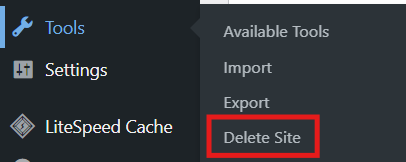
Sites@UMW dashboard on the Tools tab with the Delete Site button outlined in red
  1. Check the “I’m sure I want to permanently delete my site…” checkbox.
  2. Click the Delete My Site Permanently delete your site.
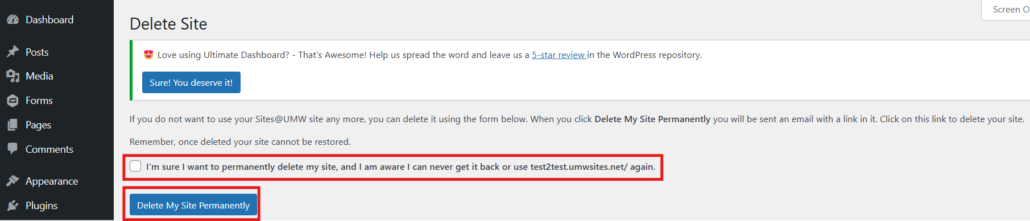
Sites@UMW Delete site page with the checkbox confirmation paragraph and the "delete my site permanently" button outlined in red
  1. You will receive an email to your UMW email with a link you must click to confirm your site deletion. Your site will not be deleted until you click the link in your email.

Email text reading "If you really want to delete your site, click the link below. You will not be asked to confirm again so only click this link if you are absolutely certain:"
  1. After clicking the link you will be brought to a page with the message below, which confirms the site has been deleted.

Site text reading "Thank you for using Sites@UMW, your site has been deleted. Happy trails to you until we meet again."

Want More Help? #

Check out our Sites@UMW guides to learn more about the platform. You can also book at appointment with a Digital Knowledge Center consultant for more assistance.

Written by Haley Gosman 11/14/24

Powered by BetterDocs

Table of Contents
  • Want More Help?
University of Mary Washington logo

Web Building at UMW

About

Terms of Service

Classic vs Block Themes Creating Footnotes in WordPress
Scroll to top